


PDF Reader & File Recovery
3.916.00 Reviews
App Specs
- Version
- 2.0.3
- Updated On
- License
- Free
- Downloads
- 100,000+
- Developer
- GLOBAL MEDICAL LTD
- Categories
- Tools
- Platform
- Android
Screenshots
 Analysis by AppCompare
I would consider PDF Reader & File Recovery if I wanted one Android utility for opening documents and attempting to restore misplaced media. Its appeal is practical rather than flashy: a PDF reader is useful on its own, while recovery tools may help when photos, videos, audio, or other files have disappeared from a device. In my view, putting those jobs together makes the app worth a look, but it also means you should judge its document tools and recovery options separately rather than assume either replaces a dedicated specialist.
How it fits into everyday phone use
PDF Reader & File Recovery is a free tools app from GLOBAL MEDICAL LTD. The current release is version 2.0.3, and its Android requirement is version 8.0 or later. The content rating is Everyone. Those details make it broadly accessible to Android users, although the minimum OS still rules it out for older devices.
The app has a modest but established audience: it has over 100,000 installs and a 3.9 average from around 700 ratings. I read that as a reason to approach it with sensible expectations. It is not an obscure experiment, but a rating in that range also suggests that a neat combination of functions does not automatically make every task effortless. The smaller pool of written reviews means the average is a useful signal, not a substitute for deciding whether its particular mix suits your routine.
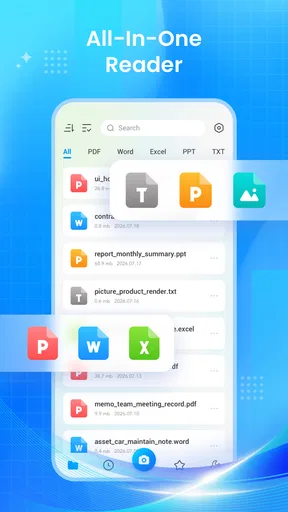
The clearest everyday use is opening a document you have just received, reading it on your phone, and keeping it alongside other files you manage there. That can be handy when a form, receipt, instruction sheet, or travel document arrives while you are away from a computer. If you also use your phone to take photos and videos, the recovery side gives the app a second purpose instead of leaving it as a reader you open only occasionally.
Where the combined approach helps
For someone who regularly handles both PDFs and loose media, having these tasks in one utility may reduce app switching. I can see the appeal for a student checking a handout between classes, a self-employed worker reviewing a form on the move, or a family member trying to find a photo that no longer appears where expected. The useful part is not simply having several labels in one app; it is having a single place to start when a file-related problem comes up.
There is an important distinction, though: reading a PDF and recovering a deleted file are different kinds of work. A reader can make a document accessible, but it cannot guarantee that a missing file is recoverable. Similarly, a recovery attempt should not be treated as a replacement for a backup. I would use the recovery tool as a possible last resort, while keeping valuable pictures and documents copied somewhere dependable.
A practical tip is to avoid adding new files or taking lots of photos immediately after you notice something important is missing. On many devices, new activity can occupy storage that might otherwise contain recoverable material. That is general file-recovery caution rather than a promise about this app’s method, but it is a sensible way to avoid making a bad situation harder while you investigate.
Worth Reading Before You Choose

Baby Panda World Brings Quick Play to Modern Phones, but Its Game Library Feels Busy

ESPN’s Live Game View Makes Following Close Games Easier

QuizzLand Review: A Good Fit for Short Trivia Breaks, Not Every Player

Basketball Stars: Multiplayer Is Fast, but Can It Recover When Matches Go Wrong?

WEBTOON Turns Phone Updates Into a Better Reading Routine

Link to Windows Runs on Shared Habits, Not Social Feeds
Reading and handling PDFs on a phone
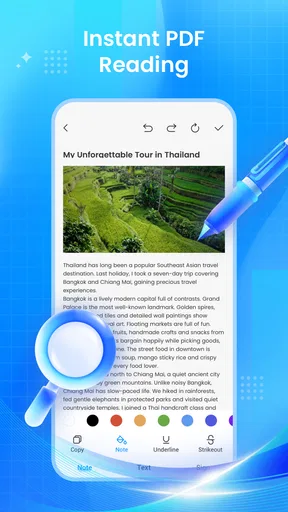
A PDF app earns its place when it saves friction at the moment you need a document. On a phone, the common challenge is not just opening a file; it is reading comfortably on a small screen, finding the right document again, and avoiding confusion between several similar downloads. I would judge this app in those everyday terms: can I get to the PDF I need, follow its pages, and return to it without losing time?
For a quick reference document, a phone reader is often more convenient than sending the file to a laptop. I would use it to check a receipt while contacting customer support, read a short set of instructions while assembling something, or review a travel confirmation while away from home. For long reports or documents with dense tables, a larger screen is still the better choice. The phone is useful for access and quick checks, not necessarily for careful study of every page.
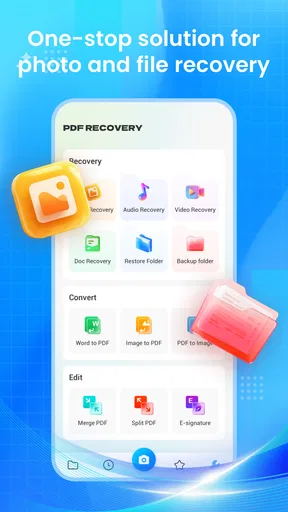
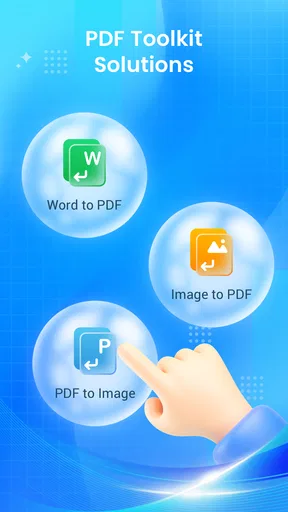
PDF conversion can also be useful, but it deserves a little care. Conversion is not the same as preserving the original layout perfectly: fonts, spacing, columns, and scanned pages can all affect how readable the result is. If I were converting a document for a formal submission, I would open the converted copy and inspect it before sending it. For a quick personal reference, a slightly imperfect conversion may be acceptable; for a contract or official form, I would prefer a workflow that lets me verify every page.
One worthwhile habit is to keep the original PDF untouched and work from a copy when a conversion or edit is involved. That makes it easier to recover from an output that loses formatting, and it avoids turning a useful source document into an uncertain replacement. This is particularly relevant on a phone, where files with similar names can be easy to mistake for one another.
What version 2.0.3 tells existing users
The current version is 2.0.3. That gives existing users a concrete version to check when comparing what is installed on their device, but a version number alone does not explain which functions changed or how the app has evolved. I would not read the number as proof that a particular feature has been added, improved, or fixed. The safe conclusion is simply that this is the current identified release, and users considering an update should check the app’s own update notes for specific changes.
The app’s release date is listed as June 12, 2026. That anchors its place in the product timeline, but it does not establish a long history of releases or say what changed between versions. For someone already using it, the practical question is whether the current build handles their own PDFs and recovery tasks reliably. If it does, there may be little reason to change a familiar workflow just because a newer version number exists; if something is not working, checking the update notes and retesting with a copy of a file is more useful than assuming an update will solve it.
Because the product combines reading, conversion, and recovery, an update could matter differently to different users. Someone who relies on the reader every day may care most about document handling, while a person opening the app only after losing media may care about the recovery workflow. I would evaluate the function I actually need, rather than treating a general update as equally important across the app.
Recovery: a useful attempt, not a safety net
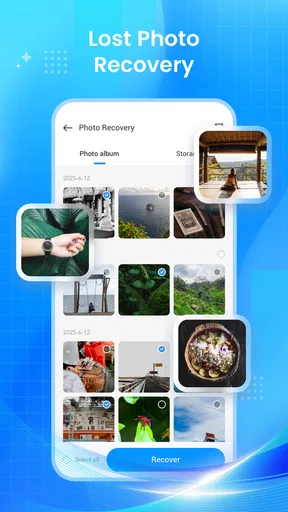
File recovery is the feature that needs the most realistic expectations. When a photo, video, audio recording, or other file vanishes, the cause matters: it might have been deleted, moved, hidden, or lost through an unrelated device issue. A recovery app cannot be assumed to handle every cause equally well. I would start by checking the phone’s own recently deleted folders and any cloud or computer backups, then try a recovery tool if those routes do not help.
For example, imagine that a picture disappears after you clean up a crowded gallery. First check whether it is in the gallery’s trash or recently deleted area; that route is usually clearer and less uncertain than a deeper recovery attempt. If it is not there, the app may be worth trying, but I would avoid saving recovered files over the same storage area when another destination is available. The point is to preserve options, not to promise that the file can be brought back.
It is also sensible to distinguish recovery from ongoing protection. This app may be useful after a loss, but a recovery tool is not a substitute for making copies of important material. For irreplaceable family photos, work recordings, or documents, I would set up a regular backup routine before anything goes wrong. That small bit of preparation is more dependable than hoping a later scan can restore every file.
A second practical trade-off is that recovery can take attention and patience without producing the result you want. Before starting, make sure you know which missing item matters most and where you would save it if it appears. That keeps the task focused and helps avoid treating a large list of files as if every result were worth restoring.
Where alternatives may serve you better
If your main need is just to read PDFs, a dedicated document reader may be a better fit. Such apps often focus on navigation, annotation, signing, or organizing documents, depending on the product. I would choose one of those when I spend a lot of time marking up work or study materials and want a workflow built around that task. PDF Reader & File Recovery is more appealing when a straightforward reader is enough and the extra file-recovery role is genuinely useful.
If your priority is recovering a critical file, the phone’s built-in trash, a cloud backup, or a computer-based recovery workflow may be the better first move. Those options can be more appropriate when the file is valuable and the circumstances are complicated. This app is most reasonable as a convenient attempt for an ordinary missing-file problem, not as the only plan for sensitive business records or irreplaceable media.
There is also a trade-off in having a broad utility rather than several focused apps. One installation can cover more than one need, but a combined app may not offer the depth that a specialist reader or recovery product provides. I would not install it merely because it advertises several jobs; I would install it if I can name a recurring PDF task and a plausible recovery use that make the combination worthwhile.
Who should try it, and what to watch
I would recommend giving it a try if you use a compatible Android phone, want a free way to handle PDFs, and would appreciate having a recovery option available for common media and files. The app is especially plausible for people who prefer one general utility over separate tools and mainly need quick access rather than a full desktop-style document workflow.
I would skip it if you need advanced PDF editing as your primary task, depend on precise conversion for formal documents, or expect file recovery to work like a guaranteed restore button. I would also look elsewhere if your device runs an Android version older than 8.0. Those are not minor distinctions: they determine whether the app fits the job at all.
For new users, I would test the reader with an unimportant PDF first, then try conversion only on a duplicate. If you later need recovery, start with the device’s own trash and backups, and treat the app as another possible route rather than a certainty. That sequence lets you learn the ordinary workflow without risking your only copy of something important.
Overall, PDF Reader & File Recovery makes most sense as a convenient, general-purpose Android tool with a useful combination of document access and file recovery. Its current version is 2.0.3, but the version number should be a prompt to check actual update details, not a claim about particular improvements. I would keep it in mind for everyday PDFs and occasional recovery attempts, while relying on specialist software or backups when the task is too important to leave to a single all-in-one app.
Pros
- Opens PDFs without requiring a separate desktop-style setup.
- Includes file recovery tools alongside PDF reading features.
- Useful for quickly checking documents stored on your device.
- Can help locate files that are difficult to find manually.
- Combines document access and file utilities in one app.
Cons
- Recovery results may vary
- especially if files were overwritten.
- Some recovery features may require broad access to device storage.
- Scanning can take time when the device contains many files.
- Recovered files may not retain their original names or folders.
- Ads or in-app purchases may limit access to some features.
FAQs for PDF Reader & File Recovery
What can I do with PDF Reader & File Recovery?
PDF Reader & File Recovery is designed to help you open and read PDF documents while also offering tools for locating or restoring files that may have been deleted or lost. The exact features can vary by app version and device, so check the listing and in-app descriptions before downloading if you need a particular recovery option or document-management tool.
Can PDF Reader & File Recovery restore every deleted file?
No file-recovery app can guarantee that every deleted item will be recoverable. Success may depend on how the file was removed, whether its storage space has been overwritten, your device’s file system, and the app’s permissions. If a file is important, avoid saving new data to the same storage location and check your backups or trash folder as well.
Does the app need access to my files or storage?
A PDF reader needs permission to find and open documents, and recovery features may request broader access to scan eligible storage. Review each permission prompt and grant only access you understand and are comfortable with. Permission names and available controls differ across Android and iOS, so consult your device settings if you want to review or revoke access later.
Is PDF Reader & File Recovery free to use?
Pricing and feature availability can differ by platform, region, and version. The app may offer core tools at no cost while placing some features behind in-app purchases, a subscription, or advertising. Check the current store listing and payment details before starting a trial or confirming a purchase, and review the cancellation terms if a recurring plan is offered.
Is it safe to use PDF Reader & File Recovery for private documents?
Treat sensitive PDFs with care, as you would in any file-management app. Review the developer’s privacy information to learn what data may be collected, processed, or shared, and avoid granting permissions that are not needed for your intended use. For confidential documents, consider whether local handling is available and keep a separate backup before attempting file recovery.


